Pages

Showing posts with label hardware. Show all posts

Wednesday, April 21, 2010

Mouse

Mouse
In computing, a mouse is a pointing device that functions by detecting two-dimensional motion relative to its supporting surface. Physically, a mouse consists of an object held under one of the user's hands, with one or more buttons. It sometimes features other elements, such as "wheels", which allow the user to perform various system dependent operations, or extra buttons or features can add more control or dimensional input. The mouse's motion typically translate into the motion of a cursor on display, which allows for fine control of a Graphical User Interface. The name mouse, originated at the Stanford Research Institute, derives from the resemblance of early models that had cord attached to the rear part of the device, suggesting the idea of a tail, to the common mouse. The mouse was first marketed was shipped as a part of a computer and intended for a personal computer navigation came with the Xerox 8010 Star Information System in 1981. However, the mouse remain relatively remained obscure until the appearance of the Apple Macintosh, in 1981 PC columnist John C. Dvorak, ironically commented on the release of this new computer with a mouse: “There is no evidence that people want to use these things.”A mouse now comes with most computers and many other varieties can be bought separately.

Tuesday, April 20, 2010

RAM

RAM
Random-access memory usually known by its acronym, RAM is a form of computer data storage device. Today it can take the form of integrated circuits that allow stored data to be accessed in any order randomly. "Random" refers to the idea that any piece of data can be stored in any place and can be returned in a constant time, regardless of its physical location and whether or not it is related to the previous piece of data.
By contrast, storage devices such as magnetic discs and optical discs rely on the physical movement of the recording medium or a reading head. In these devices, the movement takes longer than data transfer, and the retrieval time varies based on the physical location of the next item.
The word RAM is often associated with volatile types of memory such as DRAM memory modules, where the information is lost after the power is switched off. Many other types of memory are RAM, too, including most types of ROM and a type of flash memory called NOR-Flash

Motherboard

Motherboard
A motherboard is the main and the central printed circuit board (PCB) in the modern computers and holds many of the crucial components of the computer system, and provides connectors for other peripheral devices. The motherboard is also known as the main board, system board or the logic board (on Apple computers).It is also sometimes casually shortened to mobo.

Today most of the computer motherboards are designed for IBM-compatible computers, which are currently account for around 90% of global PC sales. A motherboard, like a backplane, provides the electrical connections by which the other components of the system communicate, but unlike a backplane, it also connects the central processing unit and hosts other subsystems and devices.

A typical desktop computer has its microprocessor, main memory, and other essential components connected to the motherboard. Other components such as external storage devices, controllers for video display and sound, and peripheral devices may be attached to the motherboard as plug-in cards or via cables, although in modern computers it is increasingly common to integrate some of these peripheral into the motherboard itself.

An important components of a motherboard is the microprocessor's supporting chipset, which provides the supporting interfaces between the CPU and the various buses and external components. This chipset determines, to an extent, the features and capabilities of the motherboard

RAMDAC

RAM
The RAMDAC, or Random Access Memory Digital-to-Analog Converter, converts digital signals to analog signals for use by a computer display that uses analog inputs such as CRT displays. The RAMDAC is a kind of RAM chip that regulates the functioning of the graphic card. Depending on the number of bits used and the RAMDAC-data-transfer rate, the converter will be able to support different computer-display refresh rates. With CRT displays, it is best to work over 75 Hz and never under 60 Hz, in order to minimize flicker. (With LCD displays, flicker is not a problem.) Due to the growing popularity of digital computer displays and the integration of the RAMDAC onto the GPU die, it has mostly disappeared as a discrete component. All current LCDs, plasma displays and TVs work in the digital domain and do not require a RAMDAC. There are few remaining legacy LCD and plasma displays that feature analog inputs (VGA, component, SCART etc.) only. These require a RAMDAC, but they reconvert the analog signal back to digital before they can display it, with the unavoidable loss of quality stemming from this digital-to-analog-to-digital conversion.

Video Card

Video Card

A video card is an expansion card whose function is to generate and show output images to a display device. Many video cards offer added functions, such as accelerated rendering of 3D scenes and 2D graphics, video capture, TV-tuner adapter, MPEG-2/MPEG-4 decoding, FireWire, light pen, TV output, or the ability to connect multiple monitors (multi-monitor ). Other modern high performance video cards are used for more graphically demanding purposes, such as PC games.Video hardware can be integrated on the motherboard, often occurring with early machines. In this configuration it is sometimes referred to as a video controller or graphics controller.

The first IBM PC video card, which was released with the first IBM PC, was developed by IBM Company in 1981. The MDA (Monochrome Display Adapter) could only work in text mode representing 80 columns and 25 lines (80x25) in the screen. It had a 4KB video memory and just one color.

Starting with the MDA in 1981, several video cards were released, which are summarized in the attached table.

VGA was widely accepted, which led some corporations such as ATI, Cirrus Logic and S3 to work with that video card, improving its resolution and the number of colors it used. This developed into the SVGA (Super VGA) standard, which reached 2 MB of video memory and a resolution of 1024x768 at 256 color mode.

In 1995 the first consumer 2D/3D cards were released, developed by Matrox, Creative, S3, ATI and others. These video cards followed the SVGA standard, but incorporated 3D functions. In 1997, 3dfx released the Voodoo graphics chip, which was more powerful compared to other consumer graphics cards, introducing 3D effects such as mip mapping, Z-buffering and anti-aliasing into the consumer market. After this card, a series of 3D video cards were released, such as Voodoo2 from 3dfx, TNT and TNT2 from NIVIDIA. The bandwidth required by these cards was approaching the limits of the PCI bus capacity. Intel developed the AGP (Accelerated Graphics Port) which solved the bottleneck between the microprocessor and the video card. From 1999 until 2002, NVIDIA controlled the video card market (taking over 3dfx) with the GeForce family. The improvements carried out at this time were focused in 3D algorithms and graphics processor clock rate. Video memory was also increased to improve their data rate; DDR technology was incorporated, improving the capacity of video memory from 32 MB with GeForce to 128 MB with GeForce 4.

Since 2002, ATI and Nvidia dominated the video card market with their Radeon and (respectively), sharing around 90% of the independent graphics card market forcing other manufacturers into smaller, niche markets.

Monday, April 19, 2010

Power Consumption

Power consumption become increasingly important, not just in mobile devices such as laptops but also in server and desktop markets. Increasing data center machine density has led to problems delivering sufficient power to devices (especially for spin up), and getting rid of the waste heat subsequently produced, as well as environmental and electrical cost concerns. Similar issues exist for large companies with thousands of desktop PCs. Smaller form factor drives often use less power than larger drives. One interesting development in this area is actively controlling the seek speed so that the head arrives at its destination only just in time to read the sector, rather than arriving as quickly as possible and then having to wait for the sector to come around (i.e. the rotational latency). Many of the hard drive companies are now producing Green Drives that require much less power and cooling. Many of these 'Green Drives' spin slower (5,400 rpm compared to 7,200, 10,000 or 15,000 rpm) and also generate less waste heat.

Also in Server and Workstation systems where there might be multiple hard disk drives, there are various ways of controlling when the hard drives spin up (highest power draw).

On SCSI hard disk drives, the SCSI controller can directly control spin up and spin down of the drives.

On Parallel ATA (aka PATA) and SATA hard disk drives, some support power-up in standby or PUIS. The hard disk drive will not spin up until the controller or system BIOS issues a specific command to do so. This limits the power draw or consumption upon power on.

On newer SATA hard disk drives, there is Staggered Spin Up feature. The hard disk drive will not spin up until the SATA Phys comes ready (communications with the host controller starts).

To further control or reduce power draw and consumption, the hard disk drive can be spun down to reduce its power consumption.

Sunday, April 18, 2010

Hard Disk Drive


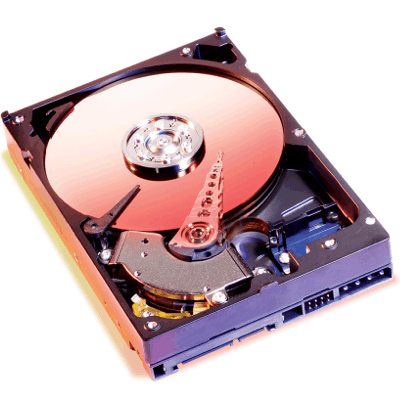
Hard disk drives records data by magnetizing ferromagnetic material directionally, to represent either a 0 or a 1 binary digit. They read the data back by detecting the magnetization of the material. A typical hard disk drive consists of a spindle that holds one or more flat circular disks called platters. The data are recorded onto the platters. The platters are made from a non-magnetic material, standard copy paper is 0.07–0.18 millimeters (70,000–180,000 nm) with an outer layer of carbon for protection. Older disks used iron(III) oxide as the magnetic material, but current disks use a cobalt-based alloy.

The platters are spun at very high speeds. Information is written to a platter as it rotates past devices called read-and-write heads that operate very close (tens of nanometers in new drives) over the magnetic surface. The read-and-write head is used to detect and modify the magnetization of the material immediately under it. There is one head for each magnetic platter surface on the spindle, mounted on a common arm. An actuator arm (or access arm) moves the heads on an arc (roughly radially) across the platters as they spin, allowing each head to access almost the entire surface of the platter as it spins. The arm is moved using a voice coil or in some older designs a stepper motor.

Hard Disk Drive


Hard disk drives was first introduced in 1956 as a data storage device for an IBM accounting computer. Then hard disk drives were originally developed for use with general purpose computers. During the 1990s, large-scale industries needed a reliable storage device that can work independent of a particular device, this lead to the introduction of embedded systems such as RAIDs, network attached storage (NAS) systems, and storage area network (SAN) systems that provide efficient and reliable access to large volumes of data. In the 21st century, HDD usage expanded into consumer applications such as camcorders, cellphones (e.g. the Nokia N91), digital audio players, digital video players, digital video recorders, personal digital assistance and video game consoles.

Hard Disk Drive

Hard Disk Drive

A
hard disk (often shortened as hard disk, hard drive, or HDD) is anon-volatile storage device that stores digitally encoded data on rapidly rotating rigid (i.e. hard) platters with magnetic. Strictly speaking, "drive" refers to the motorized mechanical aspect that is distinct from its medium, such as a tape drive and its tape, or a floppy disk drive and its floppy disk HDDs had removable media; however, an HDD today is typically a sealed unit (except for a filtered vent hole to equalize air pressure) with fixed media.

Computer Security

The term computer security is used frequently, but the content of a computer is vulnerable to few risks unless the computer is connected to other computers on a network. As the use of computer networks, especially the Internet, has become pervasive, the concept of computer security has expanded to denote issues pertaining to the networked use of computers and their resources.

Saturday, April 17, 2010

Computer Security

Computer security is a branch of computer technology known as information security as applied to computers and networks. The objective of computer security includes protection of information and property from theft, corruption, or natural disaster, while allowing the information and property to remain accessible and productive to its intended users. The term computer system security means the collective processes and mechanisms by which sensitive and valuable information and services are protected from publication, tampering or collapse by unauthorized activities or untrustworthy individuals and unplanned events respectively. The strategies and methodologies of computer security often differ from most other computer technologies because of its somewhat eluding objective of preventing unwanted computer behavior instead of enabling wanted computer behavior.

Lijit search